UGS (Horseblanket) Tool - Technical documentation
This document has been created to clarify the functionalities of the UGS tool. A web application has been developed to have the possibilities to number the buildings of a certain country by using an overpass API by OSM. Once a certain area has been numbered of a country, the numbers are stored in a local database that is processed in the backend. Each country has its own table in the backend, that holds all numbered buildings with their coordinates. The reason that each country has its table, is to create its own numbers for each country that can start from 1. The front-end has been developed using HTML, CSS and javascript/jQuery. The back-end has been developed using Nodejs. SQLite database to store the data that is located in the back-end.
Front-end
The front-end part consists of the following files
Api file:
- Has the configuration files, to configure the base url of the development/live environment.
Components file:
- Admin:
- In this file there is the admin page, that has its own privileges like getting all users, adding new users, deleting users. All these functionalities are in the admin.js.
- The styling of the admin page is in admin.css.
- Login:
- In this file we have the login page that each unauthenticated user will need to pass through. The login.js will take care of sending the username and password to the backend and redirect them to the map.
- The styling of this page is in login.css.
- Map: In the map.html are some added urls that use some external libraries like:
- http://cdnjs.cloudflare.com for the fontawesome
- http://openlayers.org/ for the OSM functionalities
- http://cdn.polyfill.io/ for some animations
- https://cdn.jsdelivr.net/ to use the htmlcanvas(taking screenshot of the screen).
- In the map.js are the most important functionalities of the map, each code snippet and functions has comments that clarifies what each code does
- Because the table is part of the map, the table.html is in the map file, this is used to display all the numbered buildings at the moment that the user has numbered in an area. It is possible to downloaded the table as a CSV file, its functionalities are in map.js see code from line 1344-1460.
- Utils
- Network manager: To take care of doing HTTP requests and error handling.
- Session manager: To take care to storing/removing the id of the user of the local storage.
- Libs:
- It has the libraries that are being used in this web application like jQuery, ol.js and ol.css
- Dist:
- It contains the minimized version of the source code of ol-ext.js and ol-ext.css. ol-ext is a set of extensions, controls, interactions, popup to use with Openlayers.
Back-end
The back-end has been built using Nodejs. It consists of the following files:
- Server.js: is to run the server on a certain port, by default on 3000. Also to connect to the appropriate database, that has been configured as one of the configuration files of an environment.
- Config:
- It has the configuration files, to set up the credentials of the database on different environments (dev, live, local). This file is created for future developments.
- Data:
- It has the knex.js file that has the configurations of the local database and the mapData.sqlite, which is the database.
- Repository:
- It has the repositories that are using the Knex library to perform the CRUD functions on the SQLite database. Each object has its own repository like User, Country and Coordinate, the repository is responsible for retrieving, deleting, updating a certain object in the database.
- RestController
- It has all the endpoints that the front-end will send it to, see code every endpoint has comments that explains what each method does.
ERD SQLite
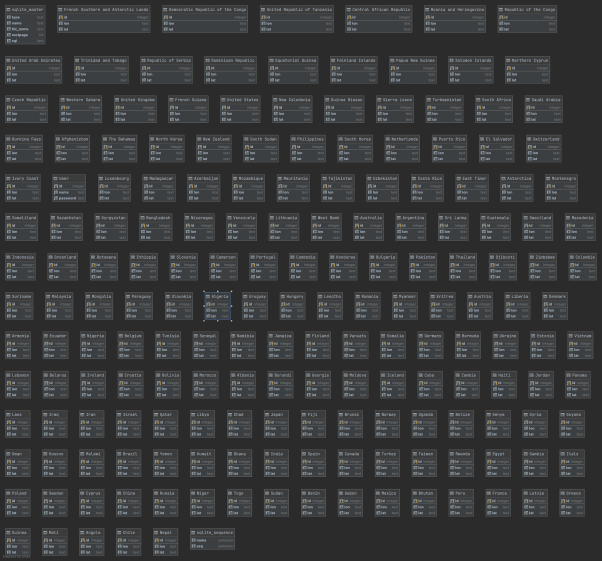
Here is an overview of the complete database,
User table: consists of the user’s id, username and password.
Each country has its own numbered buildings and coordinates